

You pointed your phone at a LEGO minifigure. Got the name back in three seconds. Great.
Then you opened BrickLink to check the price. Copied it into a spreadsheet. Moved to the next figure. Did it again. And again. Two hours later you'd processed maybe 40 figures and still hadn't listed a single one for sale.
The scan took three seconds. Everything after it took the rest of your afternoon.
That's the real question with LEGO minifigure scanners. Not whether they should cost money. But whether the one you're using actually saves you money.
How LEGO Minifigure Scanners Actually Work
Most LEGO minifigure scanners use the same basic approach. You take a photo. The app sends it to an image recognition model trained on thousands of LEGO figures. The model returns a match with a confidence score.
What most people don't realize is that the identification technology behind this isn't unique to any single app. There are publicly available AI models built specifically for LEGO recognition. Multiple apps can connect to the same underlying identification engine. Different interface, same brain.
That's not a knock on anyone. Building a good app around that technology takes real work. Design, hosting, updates, support. Developers deserve to get paid.
But it means the identification itself is often identical across apps. What separates one LEGO minifigure scanner from another isn't the scan. It's everything that happens after.
Why Identification Alone Isn't Enough
Some scanning apps keep things simple. You get figure identification, maybe a BrickLink ID, and that's the core product. For someone who scans a handful of figures a month out of curiosity, that covers the basics.
But for resellers and serious collectors, identification is just the starting line. Knowing a figure's BrickLink ID is step one out of about six. You still need the price. You still need to track it. You still need to list it. And you need to repeat that process hundreds of times per lot.
The gap between "I identified it" and "it's listed for sale" is where all the real time and money goes. If your scanner only handles that first step, you're still doing the expensive part manually.
What Should a LEGO Minifigure Scanner Actually Include?
If you're evaluating scanning tools, here's what actually moves the needle:
Pricing, not just identification. Knowing a figure's name without knowing its value is half a job. A scanner should pull real market prices automatically so you don't have to open BrickLink in a separate tab for every single figure. That manual lookup takes 2 to 3 minutes per fig. With 50 figures in a lot, that's over two hours on price checking alone.
Bulk processing. Most people scanning LEGO aren't working one figure at a time. They're sitting in front of a pile. A scanner that forces individual photos for each figure saves minimal time over a manual BrickLink search. You need to photograph a group and process them together.
Inventory management. After you scan and price your figures, they need to go somewhere. If your scanner doesn't track what you've scanned, you're maintaining a separate spreadsheet. That's double the work.
Platform exporting. Your figures end up on BrickLink, eBay, Whatnot, or Mercari. If your scanner can't export in the formats those platforms accept, you're still typing every listing by hand.
Parts scanning. Bulk lots aren't just minifigures. They come with bricks, plates, tiles, and specialty elements. Some of those parts are worth real money. A scanner that only handles figures is doing half the job.
brick'em tip: brick'em includes pricing, bulk scanning, inventory, and exporting in one tool. Scan a figure, see the BrickLink price, add it to your collection, and export to Whatnot or eBay when you're ready. Start your 14-day free trial.
The Real Math on Scanner ROI
Walk through a real scenario. You buy a 50-figure bulk lot for $60. With a scanner that only handles identification, your workflow still looks like this:
- Scan each figure individually. Get a name and BrickLink ID back.
- Open BrickLink in your browser. Search for that ID. Check the price guide. Note the average used price.
- Enter the figure into a spreadsheet or separate inventory tool.
- Repeat 49 more times.
- Manually create listings on your selling platform.
That's 3 to 4 hours of work. Even if you value your time conservatively at $20 an hour, that's $60 to $80 worth of your time processing a single lot.
Now picture a scanner that identifies the figure, shows the price, lets you add it to inventory with one tap, and exports your full lot when you're done. Same 50 figures. Under an hour. You just saved 2 to 3 hours. That's $40 to $60 back in your pocket. On one lot.
Most active resellers process 2 to 4 lots per month. That's $80 to $240 in reclaimed time every month. Against that kind of return, even a premium scanner subscription is a rounding error.
The Value Most Scanners Leave on the Table
Time savings are only half the story. A full-featured scanner also catches money you'd leave behind with manual lookups.
That Clone Trooper variant you were about to toss in a $5 bulk bin? A scanner with real pricing data flags it at $35. That printed tile you didn't think twice about? Worth $12. One catch like that pays for weeks of any subscription.
When you're manually looking up figures, you take shortcuts. You skip the ones that look common. You estimate instead of checking. You move fast because you're already two hours deep and losing patience. That's when value slips through.
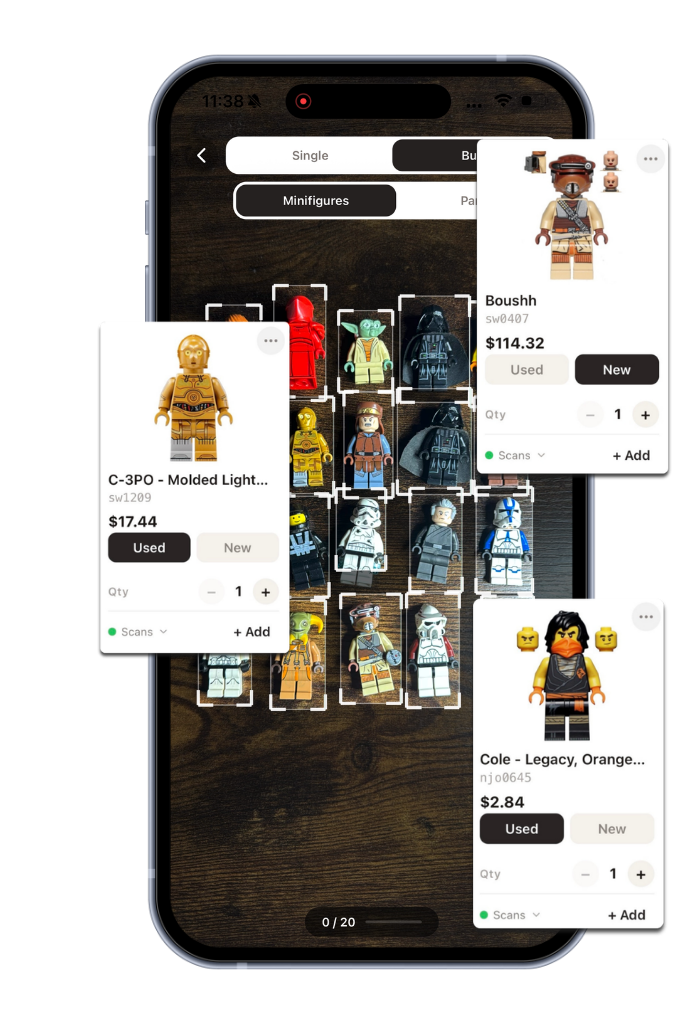
A scanner that shows you the price on every figure, every time, removes the guesswork. You stop leaving money in the reject pile.
What brick'em Includes Beyond Scanning
brick'em was built by LEGO resellers who lived through that exact manual workflow and got tired of it. The scanner is the entry point. What surrounds it is what makes the difference.
Bulk scanning. Lay out 20 or more minifigures on a table, take one photo, and brick'em detects each figure individually. Identifies and prices them all in one batch. No more one-at-a-time photography.
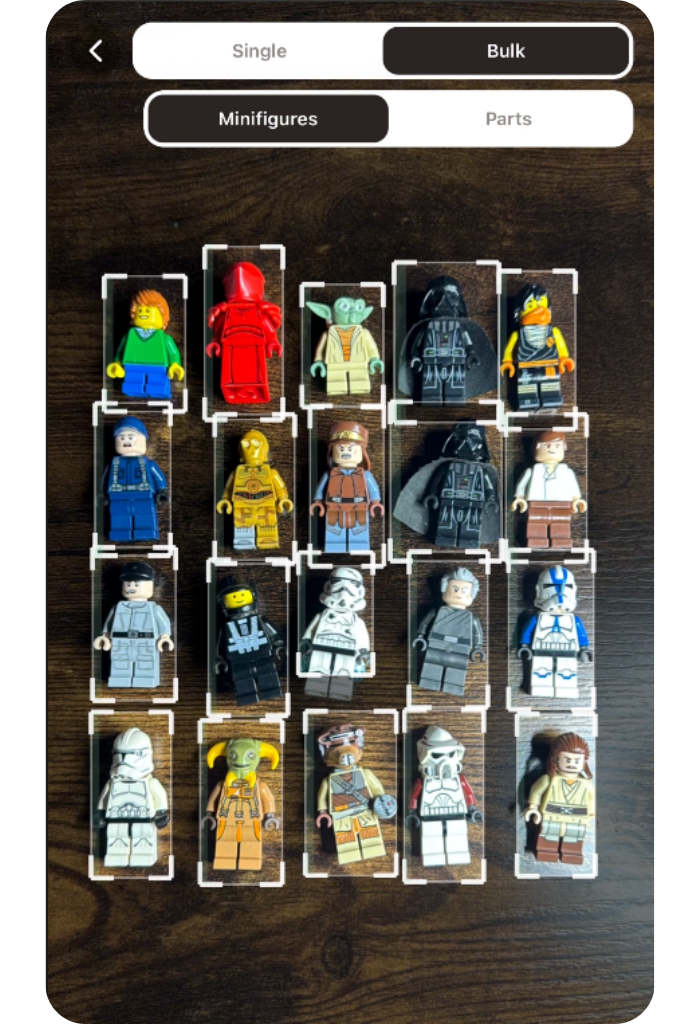
Instant BrickLink pricing. Every scan result includes the current BrickLink average price for both new and used conditions. No separate lookup. brick'em maintains a database of over 18,900 minifigure prices that updates regularly.
Built-in inventory. Scanned figures go straight into your inventory. Track what you have, what it's worth, and organize across collections.
Platform exporting. Export to Whatnot, eBay, BrickLink, or CSV in the exact format each platform expects. One tap.
Parts scanning. Toggle to parts mode and scan any LEGO brick, plate, tile, or specialty element. Same identification, same pricing.
Chrome extension. Right-click any LEGO image on eBay, BrickLink, or Facebook Marketplace and get an instant ID and price without leaving the page.
Free public database. Browse over 18,900 minifigures with prices, images, and set data. No account needed.
Add it up and brick'em replaces your BrickLink lookups, your spreadsheet tracking, your manual listing creation, and your separate inventory software. Some resellers were juggling 3 or 4 tools before switching. One subscription covers what used to take an entire stack.
Is a Free LEGO Minifigure Scanner Good Enough?
Free scanning options exist. Some work fine for casual use. If you scan 5 figures a month out of curiosity, a free tool handles that.
But free tools almost always cap your scans, strip features, or run ads. The ones that are truly free with no strings tend to disappear because they can't cover server costs long-term. And the features that actually save you hours, like bulk scanning, inventory, and exporting, are never included in a free tier.
For resellers, the real comparison isn't free vs paid. It's whether the tool you use creates more value than it costs. A scanner that saves you 8 to 12 hours a month and catches figures you'd have underpriced isn't an expense. It's one of the highest-ROI tools in your entire setup.
How to Evaluate Any LEGO Minifigure Scanner
Before committing to any LEGO scanner, run through this checklist:
- Does it include pricing? If you still look up prices separately, the scanner is only doing a fraction of the work.
- Can it handle bulk lots? One-at-a-time scanning barely beats a manual search.
- Does it track inventory? If scanned figures don't go anywhere useful, you're running two systems.
- Can you export to selling platforms? If data stays locked inside the app, you're still listing manually.
- Does it scan parts too? Minifigures are only part of what shows up in a bulk lot.
- Does it pay for itself? Do the math. Hours saved per month times your hourly rate. If the number dwarfs the subscription, it's not even a question.
A scanner that checks all those boxes isn't a cost. It's the tool that makes everything else in your workflow faster.
Frequently Asked Questions
Is there a free LEGO minifigure scanner?
Yes. brick'em offers a free trial that includes scanning, pricing, inventory, and bulk scanning. Some other apps offer limited free tiers with daily or monthly scan caps. For serious use, a paid tool that covers the full workflow saves significantly more than it costs.
Do all LEGO scanning apps use the same technology?
Many LEGO scanning apps use similar image recognition models trained on LEGO minifigure photos. Identification accuracy is often comparable across apps. The real difference is what happens after identification: pricing, inventory tracking, bulk processing, and exporting.
What is the most accurate LEGO minifigure scanner?
Accuracy depends more on photo quality than the app itself. Clear, well-lit photos of standard minifigures typically produce accuracy above 90% across most scanning apps. Custom or heavily modified figures are harder for any scanner to identify.
Is a LEGO scanning subscription worth it?
For resellers, the math is clear. A full-featured scanner saves 2 to 3 hours per bulk lot and catches underpriced figures you'd miss manually. Most active sellers recoup the subscription cost on their first lot of the month. The remaining lots are pure time savings.
Ready to see what a full scanner looks like? brick'em scans minifigures, pulls BrickLink prices, manages your inventory, and exports to every major selling platform. Start your free trial today. Create your account.

